Sitemeter widget for Wordpress
If you want to add a Sitemeter widget to Wordpress sidebar you can use this plugin. True, you can just paste the sitemeter code into a text widget but when you are using Wordpress MU that will not work. Wordpress MU will not allow to paste Jave Script code into posts.
Download
Get the Sitemeter widget here (just change the .txt extension to .php).
Install
Drop the sitemeter.php file into your wp-content/plugin and activate it. If you are running Wordpress MU just drop it in the wp-content/plugins-mu directory.
Usage
Add the widget to your sidebar and enter your Sitemeter counter code.
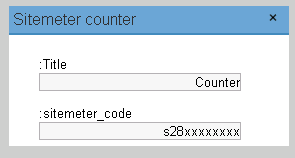
Please let me know if have any problems
Did you find this post interesting? Please subscribe to my feed.
How do I add the widget to my sidebar. The stuff above was fairly simple.
Maybe a stupid question but I can always ask.
Thanks in advance,
Pieter
Warning: array_merge() [function.array-merge]: Argument #2 is not an array in /var/www/wordpress/wp-content/plugins/widgets/sitemeter.php on line 62
Warning: Invalid argument supplied for foreach() in /var/www/wordpress/wp-content/plugins/widgets/sitemeter.php on line 80
For PHP5 try replacing line 62 with:
$options = array_merge(widget_sitemeter_options(), array(get_option(‘widget_sitemeter’)));
its a very nice blog you got here
there you go i said it
[...] Visit [...]
[...] 8th, 2008 · No Comments Sitemeter widget for Wordpress | Ring Of Blogs If you want to add a Sitemeter widget to Wordpress sidebar you can use this plugin. True, you [...]
I have using Wordpress 2.7
Thank for help in advance.